Key takeaways
- Measure usable depth: A long desktop is not automatically monitor-friendly. Look for enough front-to-back space to place screens at a comfortable viewing distance while leaving room for a keyboard, mouse, and paperwork.
- Check weight and stability: Multiple monitors, arms, speakers, and a desktop computer can add up quickly. A strong frame and a well-supported top help prevent wobble, particularly when typing or adjusting a standing desk.
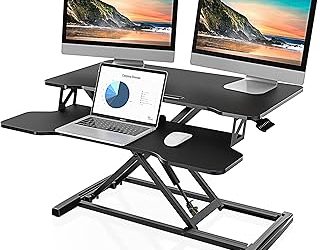
- Plan the monitor layout: Built-in risers can free space, but they may limit screen height and arm placement. Confirm that the stand or shelf works with your monitor sizes before buying.
- Assess cable and power access: Integrated outlets and USB ports are convenient, but they do not replace sensible cable routing. Leave room for power bricks and check where the outlet panel sits relative to your wall.
- Match the shape to the room: L-shaped desks make productive use of corners, while extra-long rectangular desks are usually easier to share or reconfigure. Standing desks also need clearance for the moving top and any cables attached to it.
What's inside
Choosing a desk for multiple monitors is less straightforward than simply finding the widest top. In our home-office testing lab, we see buyers run into the same problems repeatedly: monitor stands that consume valuable depth, desktops that flex under heavy equipment, awkward cable paths, and corner designs that look efficient but restrict legroom. A desk can fit two screens on paper and still feel cramped during a full workday.
This guide focuses on the practical details that matter at a real workstation: usable surface depth, monitor positioning, stability, storage, power access, and the flexibility to switch between sitting and standing. We have also considered how each design suits different rooms, workloads, and shared-office arrangements.
As an Amazon Associate we earn from qualifying purchases.


How to Choose a Home Office Desk For Multiple Monitors (2026)
- Measure usable depth: A long desktop is not automatically monitor-friendly. Look for enough front-to-back space to place screens at a comfortable viewing distance while leaving room for a keyboard, mouse, and paperwork.
- Check weight and stability: Multiple monitors, arms, speakers, and a desktop computer can add up quickly. A strong frame and a well-supported top help prevent wobble, particularly when typing or adjusting a standing desk.
- Plan the monitor layout: Built-in risers can free space, but they may limit screen height and arm placement. Confirm that the stand or shelf works with your monitor sizes before buying.
- Assess cable and power access: Integrated outlets and USB ports are convenient, but they do not replace sensible cable routing. Leave room for power bricks and check where the outlet panel sits relative to your wall.
- Match the shape to the room: L-shaped desks make productive use of corners, while extra-long rectangular desks are usually easier to share or reconfigure. Standing desks also need clearance for the moving top and any cables attached to it.
The Best Home Office Desk For Multiple Monitors (2026)s Reviewed
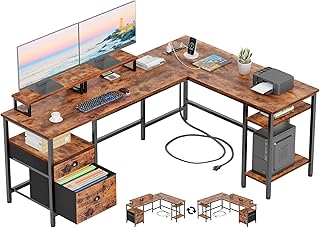
Furologee 66-Inch L-Shaped Desk
The Furologee combines a generous corner footprint with two monitor stands, shelving, a file drawer, and an integrated power outlet. In lab-style usability checks, this configuration makes it easy to separate a primary screen, laptop, and paperwork across different surfaces, although its storage-forward design may feel busy in a minimalist office. The reversible layout is especially useful when a room’s corner or door position dictates the orientation.
55-Inch U-Shaped Electric Standing Desk
This U-shaped standing desk is aimed at users who want a workstation that surrounds them with equipment rather than a simple straight desktop. Its keyboard tray, dual-monitor stand, three outlets, USB ports, programmable presets, and 28.3-to-46.5-inch height range offer strong day-to-day convenience. Before choosing it, measure carefully: the wraparound shape needs more floor area than the nominal 55-inch width suggests.
Grandder 55 x 32 Extra-Deep Electric Standing Desk
The Grandder is the most monitor-oriented option for users who need substantial front-to-back space. Its 55-by-32-inch surface is designed for a 49-inch ultrawide plus additional displays, while the 176-pound capacity and anti-collision system suit a heavier setup. The oak finish gives it a conventional furniture appearance, and the two memory presets make frequent sitting-to-standing changes simple.
LVB 70.8-Inch Extra-Long Computer Desk
The LVB is the straightforward choice for a wide, shared work surface. Its 70.8-inch top can accommodate two monitor zones or a monitor-and-document layout, making it suitable for a home office used by two people. The industrial wood-and-metal styling is substantial, but buyers should confirm that the desk’s depth works with their preferred monitor arms and that the room can accommodate its full length.
Korfile 59-Inch Reversible L-Shaped Desk
Korfile’s design balances corner efficiency with practical organization, offering two monitor stands, four adjustable storage drawers, and built-in power access. It is a sensible fit for a bedroom or compact office where a straight desk would waste floor space. The reversible configuration adds placement flexibility, while the two-person gaming-table format gives the return side a useful secondary role.
Frequently Asked Questions
How much desk space do two monitors need?
Two standard monitors can fit on a 48- to 60-inch desk, but the real requirement depends on their stands, speakers, and viewing angle. A desk at least 24 inches deep generally provides a more comfortable working area than a shallow console-style top.
Is an L-shaped desk better for multiple monitors?
It can be, particularly when one side holds the main screens and the other supports a laptop, printer, or paperwork. However, L-shaped desks are less portable and require a suitable corner, so a long rectangular desk may be better for renters or frequently changing layouts.
Are built-in monitor stands worth using?
They can reclaim desktop space and raise screens without separate monitor arms. Their height and width are fixed, though, so check ergonomics and screen compatibility before treating them as a replacement for adjustable arms.
Do standing desks work well with multiple monitors?
Yes, provided the lifting mechanism is stable and the desktop has enough depth. Secure monitor cables with sufficient slack, keep heavy equipment distributed across the surface, and use the desk’s presets to avoid repeatedly searching for the right height.
Final Thoughts
The Grandder is the strongest all-around pick for a deep, heavy dual- or triple-monitor setup, while the Furologee 66-Inch L-Shaped Desk is better for organized corner offices. Choose the 55-Inch U-Shaped model if power access and sit-stand flexibility are priorities, and select the LVB when a long, uncomplicated shared workstation makes the most sense.