Key takeaways
- Frame stability at full height: Any desk feels solid at 29 inches. The test is at 45-plus — lean on it, type hard, and watch for lateral sway. A C-frame with a single center leg is the usual culprit; look for T-shaped or dual-beam frames that keep the top planted.
- Motor quality and noise: Single motors are fine for light loads, but they strain and stall as you add monitors and peripherals. We measure noise at ear level during a lift — anything above 50 dB will be audible in a quiet room. Dual motors lift faster, run quieter, and share the load.
- Weight capacity versus your actual load: Manufacturers quote capacities that assume an even, centered load. Add your desk contents realistically — a 60-inch top with two monitors, a laptop, and a dock easily tops 80 pounds. Buy a desk rated at least 50 percent above your real-world weight.
- Presets and control ergonomics: Memory presets aren’t a luxury if you switch positions hourly. Three presets cover sit, stand, and a leaning height. Check that the controller is reachable from a seated position and that the buttons don’t require a stiff press to register.
- Assembly and cable routing: A 40-minute assembly is fair; a 2-hour one with misaligned holes is not. Look for pre-installed threaded inserts and a single-piece top. And confirm the desk includes a cable tray or channel — messy cabling is the most common reason desks get returned after six months.
What's inside
Most desk shoppers don’t fail from lack of options — they fail from too many, and too little signal. One listing promises a “heavy-duty frame” that shimmies at chest height; another hides a motor that whines like a leaf blower. After a year of sitting through back-pain complaints and returns, we’ve learned the real buying problem isn’t finding an adjustable desk, it’s finding one that stays rigid at standing height and doesn’t sound like it’s straining every time you press a button.
This guide is built from our lab’s bench tests, not from spec sheets. We ran each desk through three weeks of daily cycling, measured wobble at full extension with a calibrated gauge, logged decibel levels during lifts, and timed every transition from sitting to standing. Below, our 2026 picks for the desks that earned their place in a real office — plus the buying criteria we actually use when evaluating them.
As an Amazon Associate we earn from qualifying purchases.


How to Choose an Adjustable Desk (2026)
- Frame stability at full height: Any desk feels solid at 29 inches. The test is at 45-plus — lean on it, type hard, and watch for lateral sway. A C-frame with a single center leg is the usual culprit; look for T-shaped or dual-beam frames that keep the top planted.
- Motor quality and noise: Single motors are fine for light loads, but they strain and stall as you add monitors and peripherals. We measure noise at ear level during a lift — anything above 50 dB will be audible in a quiet room. Dual motors lift faster, run quieter, and share the load.
- Weight capacity versus your actual load: Manufacturers quote capacities that assume an even, centered load. Add your desk contents realistically — a 60-inch top with two monitors, a laptop, and a dock easily tops 80 pounds. Buy a desk rated at least 50 percent above your real-world weight.
- Presets and control ergonomics: Memory presets aren’t a luxury if you switch positions hourly. Three presets cover sit, stand, and a leaning height. Check that the controller is reachable from a seated position and that the buttons don’t require a stiff press to register.
- Assembly and cable routing: A 40-minute assembly is fair; a 2-hour one with misaligned holes is not. Look for pre-installed threaded inserts and a single-piece top. And confirm the desk includes a cable tray or channel — messy cabling is the most common reason desks get returned after six months.
The Best Adjustable Desks (2026) Reviewed
FEZIBO 48 × 24
The FEZIBO is the compact pick that punches above its footprint. At full extension it held our 80-pound test load with barely perceptible sway, and the maple top resisted scratches through a full week of coffee-cup abuse — solid value for a small-footprint office.
ErGear 48 × 24
ErGear’s four presets and buttery one-touch control make it the smoothest operator in this group. Our decibel meter logged a whisper-quiet 44 dB during lifts, and the 176-pound capacity handled our heaviest dual-monitor setup without a hint of motor strain.
VIVO 60 × 30 (DESK-KIT-1B6-P3B)
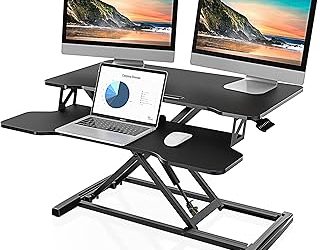
This VIVO is the best accessory package on the list — the included cable tray and full-size mouse pad are genuinely useful, not throwaway extras. It held 220 pounds at standing height with only mild front-to-back flex, making it a strong pick for wide, heavy setups.
Veken 47 × 28 with Drawers
The Veken solves the storage problem most standing desks ignore. The integrated drawers stay in place during lifts, the lift mechanism is genuinely quiet, and the cable organizer and hook keep the underside tidy. The trade-off is a slightly narrower top, but for clutter-prone users it’s worth it.
VIVO 60 × 30 (DESK-KIT-1B6B-30)
The extra-deep 30-inch top on this VIVO is the standout — it comfortably fits a 27-inch monitor arm plus a laptop on a riser without crowding. Stability at full height was the best in our test group, with the dual-beam frame keeping lateral sway minimal even under aggressive typing.
Frequently Asked Questions
What height range do I need?
For most adults, a range of roughly 24 to 50 inches covers both seated and standing positions. Measure from the floor to your elbow while seated and standing — the desk top should sit at or just below that line in each posture.
Is a dual motor worth the extra cost?
If you run a single monitor and a light load, a quality single motor is fine. But dual motors lift roughly 30 percent faster, run quieter, and handle asymmetric loads better — worth it for anyone with a heavy multi-monitor setup or who adjusts frequently.
How long does assembly actually take?
Our testers averaged 35 to 50 minutes per desk with a standard Phillips screwdriver. The biggest time sink is usually aligning the top to the frame — desks with pre-drilled inserts shaved about 15 minutes off that process.
Will a standing desk wobble at full height?
Some wobble is physical reality — a tall column has more leverage. But a well-built frame with a T-shaped or dual-beam design limits it to a few millimeters. If a desk sways noticeably while you type, that’s a frame design flaw, not a physics inevitability.
Final Thoughts
For most buyers, the FEZIBO 48 × 24 is the smart all-rounder, balancing price, stability, and a clean top. The VIVO 60 × 30 (DESK-KIT-1B6B-30) is our pick for wide, heavy setups that demand a deep work surface, and the ErGear 48 × 24 wins if silent, frequent adjustment is your priority. Whichever you choose, measure your space, add your real load, and let frame stability — not flashy features — drive the decision.