
Key takeaways
- Let the monitor warm up according to the manufacturer’s recommendation before calibration.
- Use a colorimeter or spectrophotometer rather than judging color by eye.
- Match the calibration target to delivery: Rec. 709 for standard SDR video, and an appropriate wide-gamut or HDR target for supported mastering work.
- Keep the operating system and editing application color management enabled.
- Recalibrate periodically, especially if the display is used many hours each week.
- Review real footage on a second, ordinary display or television when the audience will watch on consumer equipment.
The best color grading monitors for video editors are the EIZO ColorEdge CG2700X for dependable professional accuracy, the ASUS ProArt Display PA32UCG for HDR mastering, the BenQ SW272U for detailed SDR work in a smaller editing setup, and the LG UltraFine OLED Pro 32BP95E for deep blacks at a comparatively accessible professional price.
Quick picks by editing situation
| Editing situation | Best fit | Why it makes sense | Typical market range |
|---|---|---|---|
| Professional SDR and print-quality color | EIZO ColorEdge CG2700X | 27-inch 4K screen, built-in calibration, wide gamut, and excellent uniformity | Usually $2,000–$3,000 |
| HDR mastering and a high-end grading suite | ASUS ProArt Display PA32UCG | 32-inch 4K Mini LED panel with very high peak brightness and extensive HDR support | Usually $2,000–$3,000 |
| Small desk or detailed SDR editing | BenQ SW272U | 27-inch 4K IPS display with Adobe RGB coverage, hardware calibration, and a shading hood | Usually $600–$900 |
| OLED contrast without a premium reference-monitor price | LG UltraFine OLED Pro 32BP95E | 32-inch 4K OLED with excellent black levels and wide-gamut coverage | Usually $2,000–$3,000 |
| Value-oriented 4K color workflow | ViewSonic ColorPro VP2786-4K | 27-inch 4K IPS monitor with factory calibration and hardware-calibration support | Usually $500–$800 |
What matters most in a color grading monitor
Color gamut is about the delivery format
For ordinary web video and most SDR work, a monitor that covers essentially all of sRGB and Rec. 709 is the baseline. Adobe RGB is more valuable when your workflow also includes photography or print. For cinema, HDR, and wide-gamut delivery, look for strong DCI-P3 coverage and a panel capable of displaying more colors than a standard sRGB monitor.

BenQ Creative Pro PV3250U 32” 4K Monitor for Color Grading & Video Editing
Included for 'Best Color Grading Monitors for Video Editors' as a relevant option in this category; details come from the product listing.
View on Amazon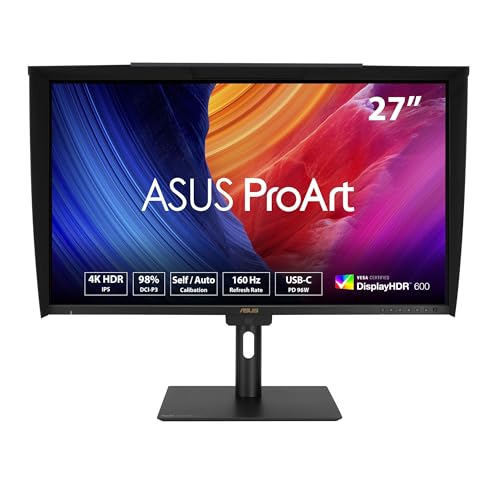
ASUS ProArt PA27UCGE 27 Inch 4K HDR USB-C Professional Monitor for Mac
Included for 'Best Color Grading Monitors for Video Editors' as a relevant option in this category; details come from the product listing.
View on Amazon
Eizo ColorEdge CG319X 31.1" Wide Screen Hardware Calibration IPS LED 4K Monitor, 4096x2160
Included for 'Best Color Grading Monitors for Video Editors' because the listing specifies 4096x2160, details this guide uses to compare options.
View on AmazonA wide gamut does not automatically mean accurate color. If the display is not calibrated or the application is not color-managed, saturated colors can appear exaggerated. A monitor with excellent Rec. 709 accuracy may be more useful than a cheaper, wider-gamut screen that cannot be controlled reliably.
Factory calibration and Delta E
Factory calibration gives you a more trustworthy starting point, but it is not a substitute for calibration in your own room. Look for a supplied calibration report that identifies the tested color space, white point, gamma, and Delta E result. A lower average Delta E means the displayed color is closer to the reference color; an average Delta E below 2 is a useful target, while values below 1 are more appropriate for demanding reference work.
Hardware calibration is a major advantage. It lets calibration software write corrections into the monitor rather than depending entirely on the computer’s graphics card profile. EIZO’s ColorEdge range is particularly strong here, while BenQ and ViewSonic offer hardware-calibration workflows on selected professional models.
Resolution and screen size
4K resolution is the practical sweet spot for video editing. On a 27-inch screen it provides a sharp interface and enough room to view a 4K timeline or footage at useful size. A 32-inch 4K display gives larger video previews and more comfortable full-resolution viewing, but its pixels are less dense.
Choose 27 inches if your desk is shallow or you sit approximately 24–30 inches away. Choose 32 inches if your viewing distance is closer to 30–40 inches and you have enough depth for the monitor, stand, keyboard, and speakers. A 32-inch monitor can dominate a compact desk even when its footprint appears modest on paper.
HDR performance requires more than an HDR label
HDR grading benefits from high peak brightness, meaningful local dimming, and a wide color gamut. A typical IPS monitor may accept an HDR signal but produce limited contrast because its backlight cannot control bright and dark areas independently. OLED produces exceptionally deep blacks and strong pixel-level contrast, but prolonged static interface elements can create image-retention or burn-in concerns.
The ASUS PA32UCG is the strongest choice in this group for serious HDR evaluation because its Mini LED backlight provides high brightness and local dimming. The LG 32BP95E is compelling when black-level performance matters more than sustained full-screen brightness. For mostly SDR editing, paying extra for extreme HDR capability may not improve your finished work.
Head-to-head comparison
| Monitor | Panel and size | Resolution | Color coverage and accuracy | HDR characteristics | Useful connections |
|---|---|---|---|---|---|
| EIZO ColorEdge CG2700X | 27-inch IPS | 3840 × 2160 | Wide-gamut professional display; built-in sensor and hardware calibration; factory Delta E specifications vary by mode | HDR signal support, but not a high-brightness Mini LED reference display | USB-C with power delivery, DisplayPort, HDMI, USB hub |
| ASUS ProArt PA32UCG | 32-inch IPS with Mini LED backlight | 3840 × 2160 | Wide-gamut coverage including DCI-P3 and Adobe RGB modes; factory-calibrated professional presets | Very high peak brightness, local dimming, and multiple HDR standards | USB-C, DisplayPort, HDMI, USB hub |
| BenQ SW272U | 27-inch IPS | 3840 × 2160 | Full sRGB and Rec. 709 coverage, high Adobe RGB coverage, hardware calibration, reported average Delta E below 2 | HDR input support, but not designed as a high-brightness HDR mastering monitor | USB-C, DisplayPort, HDMI, USB hub |
| LG UltraFine OLED Pro 32BP95E | 31.5-inch OLED | 3840 × 2160 | Wide DCI-P3 and Adobe RGB coverage with professional factory modes | Outstanding black levels and contrast; lower sustained brightness than a Mini LED display | DisplayPort, HDMI, USB hub |
| ViewSonic ColorPro VP2786-4K | 27-inch IPS | 3840 × 2160 | Wide-gamut coverage, factory calibration, and hardware-calibration support; reported Delta E below 2 in calibrated conditions | Basic HDR support rather than reference HDR performance | USB-C, DisplayPort, HDMI, USB hub |
Which monitor fits your editing desk?
For a small apartment or shallow desk
The BenQ SW272U or ViewSonic VP2786-4K is easier to live with than a 32-inch display. Allow at least 24 inches of desk depth for a 27-inch monitor, its stand, and a comfortable keyboard position. If the desk is only 20–22 inches deep, use a monitor arm and place the screen as close to the rear edge as practical. A hood is valuable near a window because reflected light can undermine careful shadow judgments.
For a dedicated grading room
Choose the EIZO CG2700X for controlled SDR work and the ASUS PA32UCG for HDR. Leave roughly 30–36 inches of viewing distance for a 32-inch screen, plus enough side clearance for reference speakers or a control surface. Keep the display away from direct sunlight and use neutral, dim ambient lighting; a brightly lit wall behind the screen can make blacks appear deeper than they really are.
For renters or frequently moved workstations
A 27-inch IPS monitor is easier to move through a narrow doorway and less risky on a lightweight desk. Check the assembled stand depth and the box dimensions before ordering. Many professional 27-inch monitors weigh approximately 15–25 pounds with their stands, while a large 32-inch display can approach or exceed 30 pounds. Remove the stand before carrying the monitor, keep the panel upright, and use two people for a large screen.
For long editing sessions
Prioritize a height-adjustable stand or VESA mounting, flicker-controlled backlighting, and a matte coating that does not produce distracting reflections. Set the top edge near eye level and keep the screen centered rather than angled sharply. A monitor that is technically accurate but too low, too close, or constantly reflecting a window will be harder to use well.
Calibration and room setup
- Let the monitor warm up according to the manufacturer’s recommendation before calibration.
- Use a colorimeter or spectrophotometer rather than judging color by eye.
- Match the calibration target to delivery: Rec. 709 for standard SDR video, and an appropriate wide-gamut or HDR target for supported mastering work.
- Keep the operating system and editing application color management enabled.
- Recalibrate periodically, especially if the display is used many hours each week.
- Review real footage on a second, ordinary display or television when the audience will watch on consumer equipment.
Final buying advice
For the most dependable professional workflow, the EIZO ColorEdge CG2700X is the safest all-round recommendation. Select the ASUS PA32UCG when HDR brightness and local dimming are central to the job. The BenQ SW272U offers the best balance for many independent editors who need accurate 4K SDR color without a huge screen. Choose the LG OLED Pro when contrast and black-level detail are priorities, and the ViewSonic VP2786-4K when you want a capable calibrated 27-inch workspace at a lower market range.
Whichever model you choose, budget for a calibration device, controlled lighting, and a desk deep enough to place the monitor at a comfortable distance. Those practical details often have as much influence on grading consistency as the panel’s headline specifications.
