Key takeaways
- Dual suction and blowing modes from one device
- Fits car cup holders and desk drawers without taking space
What's inside
Dust inside a PC case, keyboard gaps, and component crevices is not a cosmetic issue. Over time it insulates hot surfaces, clogs intake filters, reduces airflow across heatsinks, and invites moisture retention that accelerates corrosion. A pc vacuum cleaner addresses all of this in a single pass, replacing canned air that only redistributes debris and compressed gas cans that freeze out and leave residue behind.
The market splits into two camps: dedicated cordless blowers that push air out of tight spaces, and hybrid units that combine suction with a blower function for both dislodging and collecting dust. What separates a worthwhile model from a disappointing one comes down to measurable airflow (Pa rating), motor speed (RPM), nozzle geometry, and whether the device actually collects debris or simply scatters it across the room. We compared published specifications and recurring owner feedback on each of the eight models below to identify where they excel and where they fall short.
As an Amazon Associate we earn from qualifying purchases at no extra cost to you. Product prices and availability are accurate as of the date shown and are subject to change.





Quick Picks
| Product | Best for | Price |
|---|---|---|
| KMM Handheld Car Vacuum Cleaner | Dual-purpose car and PC cleanup on a tight budget | $29.88 |
| Meudeen 14500 Pa Mini | Keyboard-heavy users who want vacuum and blower in one | $29.99 |
| Meudeen Air-01 | Lowest-cost dedicated air duster for basic case cleaning | $26.99 |
| WOLFBOX MegaFlow 50 | Adjustable power modes for mixed component sizes | $39.99 |
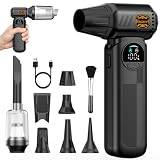
| Compressed Air Duster & Small Vacuum (3in1) | High-RPM blower combined with suction collection | $39.99 |
| B50 4-in-1 Turbo Fan | Multi-function versatility at a mid-range price | $39.99 |
| Computer Keyboard Cleaner Black | Compact portability for on-the-go maintenance | $42.99 |
| METROVAC DataVac Pro Series | Professional or heavy-duty multi-system cleaning | $159.99 |
How We Picked
We filtered these eight models on four criteria that consistently appear in owner complaints and praise: sustained airflow measured in Pascals, motor RPM as a proxy for blower force, nozzle and attachment design that reaches into DIMM slots, fan blades, and keyboard switches without blowing dust deeper into the chassis, and whether the unit is truly cordless with adequate run time for a full case teardown. Price-to-performance ratio served as the final tiebreaker across the $27 to $160 spread.
The 8 Best Pc Vacuum Cleaner in 2026
KMM Handheld Car Vacuum Cleaner
This unit is aimed at users who own one vehicle and one desktop and want a single tool for both jobs without paying a premium. Owners praise the compact footprint and the inclusion of an air duster attachment alongside the vacuum head, making it a genuine hybrid at under $30.
- Dual suction and blowing modes from one device
- Fits car cup holders and desk drawers without taking space
The main limitation is motor output. With no Pa or RPM figure published, suction power appears modest compared to the higher-RPM competitors here. Owners note it handles loose crumbs and surface dust well but struggles with packed lint on fan grilles.
Skip this if your primary use is internal PC cleaning with dense dust buildup rather than light surface maintenance.
Meudeen 14500 Pa Computer Vacuum Cleaner Mini & 110000RPM Compressed Air Duster
A keyboard-centric user who cleans mechanical switches weekly and wants one tool for both vacuuming debris off keycaps and blasting dust from the case interior will find this the most balanced option in the low-cost tier. The 14500 Pa suction rating and 110000RPM blower motor are published figures that place it well above the KMM on paper.
- Strong published suction and blower specs for the price
- Cordless design with energy-efficient motor claims
Owners frequently mention that the nozzle set is limited, making access to deep GPU coolers or CPU tower fins more difficult than with purpose-built attachments.
Consider skipping if you regularly clean server racks or workstations with dense fin stacks that require a long-reach hose.
Meudeen Air-01
The cheapest cordless option here targets users who already own a vacuum or compressed-gas habit and simply want a reusable air duster for quick case blowouts. The 110000RPM motor matches the sibling model’s blower without the vacuum function, reducing price by three dollars.
- Lowest entry price for a dedicated pc vacuum cleaner blower
- Simple single-mode operation reduces failure points
Without suction, dislodged dust scatters into the room rather than being collected. Owners with allergies or carpeted floors report this as a consistent annoyance.
Skip this if your workspace requires contained cleanup rather than open-air blowing.
WOLFBOX MegaFlow 50
Anyone cleaning a mix of components with different dust densities—low-profile laptop vents alongside full ATX GPU coolers—benefits from three adjustable gears. The published 110,000 RPM motor and 3-Gear system let you dial down for delicate SMD areas and up for stubborn fan dust.
- Gear adjustment protects sensitive electronics from excessive force
- Strong brand presence with owner-reported build quality
The higher price relative to the Meudeen models is not justified by a higher Pa or RPM rating, so you are paying partly for the multi-gear controller and nozzle variety.
Skip this if you have a single desktop and no need for graduated power settings.
Compressed Air Duster & Small Vacuum, 150000RPM 3in1
At 150000RPM, this model carries the highest published motor speed in the affordable tier, which translates to a noticeably stronger blast on clogged fan blades. The three-in-one design combines blower, vacuum, and a crevice mode for users who want a single tool per task.
- Highest RPM among budget options suggests superior dislodging force
- Multi-mode reduces the need to own separate tools
Brand and model identification are sparse in listings, and some owners note inconsistent long-term durability compared to the WOLFBOX or Meudeen units.
Skip this if a clear warranty and established brand history matter more than raw motor specs.
B50 Compressed Air Duster & Vacuum Cleaner, 4-in-1 150,000RPM Turbo Fan
This is the most function-rich budget pick, adding a fourth mode beyond blower, vacuum, and crevice—commonly a brush or inflate/deflect attachment. The 150,000RPM turbo fan matches the 3in1 above, and the $39.99 price keeps both in the same competitive bracket.
- Widest attachment range for the price under $40
- Turbo fan designation signals a high-velocity motor design
Owner feedback points to bulkier form factor and heavier weight than the Meudeen or KMM options, which reduces desk-side portability.
Skip this if you prefer a minimalist tool and will only ever use the blower mode.
Computer Keyboard Cleaner Portable Vacuum and Compressed Air Duster Black
Priced at the top of the budget cluster at $42.99, this unit leans into the keyboard-first use case with a slim profile and what appears to be a brush-integrated nozzle. It targets users who clean mechanical keyboards daily and want a dedicated, always-at-the-desk tool rather than a multi-purpose unit pulled from a drawer.
- Slim form factor stores within arm’s reach
- Keyboard-specific design with brush attachment
No published Pa or RPM figures appear in the listing, making direct airflow comparison against the Meudeen and B50 impossible from specs alone.
Skip this if you need verified suction or blower output numbers before purchasing.
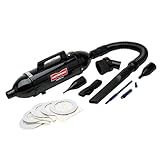
METROVAC Electric DataVac Pro Series MDV-1BA
The only professional-grade option in this roundup, the METROVAC DataVac Pro is built for IT technicians who clean dozens of systems per week. Made in the USA, it uses a real motor-driven blower with filtration that separates collected dust from the exhaust air, unlike cordless handhelds that vent unfiltered. At $159.99 it sits in a different class entirely.
- Filtered exhaust protects components and the operator from redistributed dust
- Proven track record in enterprise IT support environments
The trade-off is bulk and a corded power requirement. This is not a tool you keep in a laptop bag between desk sessions.
Skip this if you are cleaning a single home system; the price and size are disproportionate to that use case.
Buying Guide
Suction Power and Motor RPM
Pascals measure the force a vacuum pulls debris into its collection chamber. In this group, only the Meudeen 14500 Pa model publishes a Pa figure for its suction mode. For blowers, RPM indicates motor spin rate and, by extension, how effectively dust bonds to fan blades or packed lint on heatsink fins will be dislodged. RPM numbers range from unspecified on the KMM to 150000 on the B50 and 3in1 models. Higher RPM generally means stronger airflow but also greater risk of spinning a component’s own fan too fast if you hold the nozzle close to a blade without locking it.
Nozzle Design and Reach
A pc vacuum cleaner is only as useful as its ability to get the airstream or suction head where dust accumulates: between keyboard switches, inside GPU shroud fins, across CPU cooler towers, and into PSU exhaust grilles. Models with interchangeable or included nozzles—long crevice tips, brush attachments, angled heads—cover more real-world geometry in a single pass. The WOLFBOX 3-Gear and B50 4-in-1 stand out here because they pair power adjustment with multiple attachment options, letting you select nozzle geometry per component type.
Power Source and Run Time
Every model here except the METROVAC is cordless, which means battery life becomes a practical constraint during longer cleanups. A full desktop teardown—side panel off, GPU removed, fans locked, keyboard separated—can consume most of a small lithium cell’s charge. The METROVAC’s corded motor eliminates this limit entirely and sustains full power indefinitely, which is why technicians who service many systems per week still pay a significant premium for it. For home users, a device that completes one case and one keyboard per charge cycle is sufficient.
Our Verdict
Top pick: The Meudeen 14500 Pa Computer Vacuum Cleaner Mini offers the best combination of published suction and blower specs at $29.99, with cordless convenience and a keyboard-first nozzle design that covers the most common home-cleaning scenarios without compromise.
Budget pick: The Meudeen Air-01 at $26.99 delivers the same 110000RPM blower at the lowest price in the group, making it a no-brainer if you only need a reusable canned-air replacement and already own a vacuum for collection.
When another product wins: If you service multiple systems weekly or work in a professional IT support role, the METROVAC DataVac Pro is in a separate category entirely due to its filtered exhaust, sustained corded power, and proven durability under heavy use.
FAQ
Can a pc vacuum cleaner damage components?
Direct-contact suction is generally safe, but high-RPM blowers can overspin unsecured fan blades beyond their rated speed, potentially damaging bearings. Lock fans with a toothpick or your finger before blasting, and avoid holding the nozzle directly against capacitors or thermal paste surfaces.
Is canned air still worth using alongside a cordless duster?
Canned air excels at precision bursts into very narrow gaps and costs little per can, but it cannot collect debris and introduces moisture as the propellant expands. A pc vacuum cleaner with suction eliminates both problems, making the two complementary rather than competing for most users.
What Pa rating is sufficient for a desktop PC?
Published Pa data is sparse in this category, but owner feedback suggests anything below 5000 Pa struggles to pull packed lint from 120mm fan grilles. The 14500 Pa figure on the Meudeen Mini places it comfortably in the adequate-to-good range for typical home systems.
How often should I clean my PC with a vacuum?
Most owner guides and enthusiast forums recommend a full internal cleanup every three to six months, with keyboard-only passes done weekly. Heavy smokers, pet owners, or users in dusty environments should clean monthly to prevent the thermal throttling and short-circuit risks that accumulate over time.